I’ve spent a lot of time over the past year working with coding agents, and one thing has become very clear to me: the big productivity gain doesn’t come from how fast the agent can write code. It comes from whether the agent can verify its own work.
When an agent implements a feature or bug fix, and then immediately builds the code, runs the tests, checks the logs, and validates the behavior - all without waiting for me - the iteration cycle drops from hours to minutes. That’s the loop I want to close.
The thing is, whether that loop can be closed is mostly decided before the agent writes a single line of code.
Start with a Spec, Not a Vibe
Vague prompts produce vague results. If I tell an agent to “make the login page better”, it will certainly produce something, but neither of us has any real way to know if it did the right thing. That’s not a spec, that’s a wish.
What works is investing some time up front (with the agent, with teammates, with stakeholders) to define success. A spec doesn’t need to be a formal document. It can be a set of acceptance criteria, a failing test, a user story with clear done conditions, or even a detailed conversation that gets recorded as a markdown file in the repo.
ℹ️ Recording plans as markdown files in the repo is a big part of my own Claude Code workflow.
What matters is that both the agent and the developer have a shared, explicit definition of what “done” means.
You also don’t have to write the spec yourself. One of my favorite time savers is to describe what I want in a few sentences and ask the agent to draft the spec. It usually produces something more complete than I would have typed out on my own, including edge cases and acceptance criteria I might not have bothered to write down. Then I iterate on it - correct what it got wrong, cut what doesn’t matter, add what it missed. Reviewing and refining a draft is much faster than starting from a blank page, and as a bonus the agent ends up working from a spec it helped create.
“Done” should also include more than functional behavior. If performance, memory usage, bandwidth, startup time, or cost matter, put them in the spec as explicit targets. If they aren’t in the spec, don’t be surprised when the agent ignores them.
That definition of done is what the agent works against. Without it, there’s no loop to close.
The Inner Loop
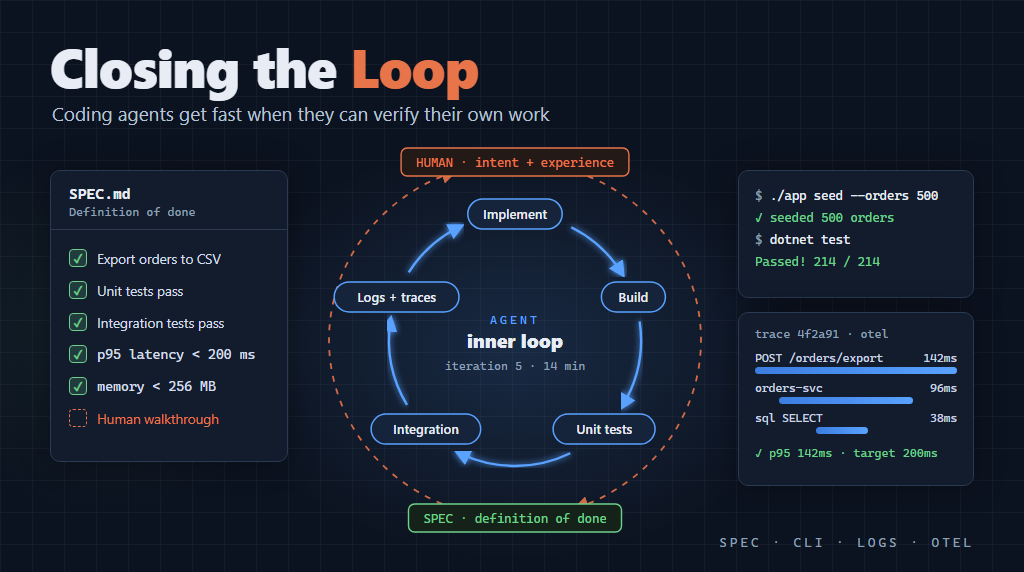
Once the spec exists, the agent’s job is to implement against it and then verify that it worked. This is what I think of as the inner loop:
- Implement the change.
- Build and compile.
- Run unit tests.
- Run integration tests.
- Check logs and telemetry.
- If it worked, done. If not, figure out why and go back to step 1.
By “worked” I mean it meets both the functional and technical goals. If all the tests pass but latency or memory use got worse, that’s still a failed iteration.
For a human developer, every step of this loop takes time: context switching, reading output, reasoning about what went wrong. For a coding agent with the right infrastructure in place, steps 2 through 5 happen much faster. Not instantly, but often orders of magnitude faster than a person can do the same thing. The agent also doesn’t get bored or distracted, and it doesn’t need a coffee break.
In my experience the bottleneck usually isn’t the LLM’s ability to reason. It is whether the agent has the tools to run the loop at all.
What Closes the Loop
There are three things that make the inner loop possible for an agent.
A programmable interface (preferably a CLI). The agent needs a reliable way to make the app do things. That can be a CLI, an API, or automated UI flows (for example with Playwright). If the only option is a human clicking through the UI, the agent is stuck. My preference is a CLI that exercises the same code paths as the UI - seeding data, triggering workflows, querying state - because it is usually faster, less brittle, and easier for the agent to use than driving a UI. This is worth building on purpose, not as an afterthought.
Logs. Structured, readable logs that tell the agent what actually happened when it ran something. Not just “error occurred”, but the full context: what was called, what failed, and what state the system was in. If the agent can’t read the output of its own tests and understand why something failed, it has to guess, and guessing wastes iterations. As I wrote in Full Circle Development, logging has basically become the agent’s debugger.
OpenTelemetry (OTel) and observability. For distributed systems in particular, logs from one service aren’t enough. OpenTelemetry traces span service boundaries, so the agent can follow a request end-to-end and see where things went wrong, not just that they went wrong. An agent with access to traces can diagnose integration failures that would take a person a long time to even reproduce. I describe the OTel setup I use for RockBot in Tracking Agent Metrics.
With these three things in place, the agent can close its own loop. Without them, it has to stop and ask a human every time it needs to know if something worked.
And remember, you don’t have to build all of this yourself! If the CLI, logging, and telemetry are part of the spec, the agent will build them along with everything else. In other words, the agent can create the very tools it needs to close its own loop, as long as you ask for them up front.
Making This Real in .NET
If you are building on .NET, all of this is very achievable today.
Use structured logging with Serilog. Wire Serilog into your host so every operation emits consistent, queryable events. Include correlation IDs, request IDs, and key domain identifiers in log scopes, so the agent can go from a failing test to the exact execution path. Console output is useful, but sending logs to a central sink (Seq, ELK, Azure Monitor, etc.) is what makes diagnosing problems fast.
Add OpenTelemetry. Start with a small, explicit set of OpenTelemetry .NET NuGet packages such as OpenTelemetry.Extensions.Hosting, OpenTelemetry.Instrumentation.AspNetCore, OpenTelemetry.Instrumentation.Http, and OpenTelemetry.Instrumentation.SqlClient, plus a Microsoft exporter package like Azure.Monitor.OpenTelemetry.AspNetCore if you are in Azure. This gives you traces, metrics, and logs through the same hosting model as the rest of your app. Instrument ASP.NET Core, HttpClient, and your data access, then export to your OpenTelemetry backend. When a test fails, the agent should be able to look at a trace and see cross-service latency, retries, and exactly where the failure happened.
Consider Aspire. If you use Aspire to orchestrate your app, much of this comes for free. The service defaults project wires up OpenTelemetry logging, tracing, and metrics for every service, and the Aspire dashboard collects all that telemetry in one place. The agent can get at the same data through the Aspire CLI or the Aspire MCP server, so it can list resources, read structured logs, and inspect distributed traces without anyone copying and pasting terminal output. And when it is time for the human outer loop, that same dashboard is a nice way to review what actually happened: which services were called, how long each step took, and what got logged along the way.
Run agent workloads in containers. Put the app and its dependencies in Docker (or Kubernetes) so the agent can spin up a disposable environment, run the inner loop, and tear it down without touching any shared “real” systems. In Kubernetes this might be a dev namespace with short-lived pods and strict resource limits. In Docker it might be a compose stack with ephemeral volumes and test credentials.
Protect real systems by default. Give the agent non-production endpoints, test identities, and least-privilege access. Route outbound dependencies to mocks, sandboxes, or seeded test data where possible. The idea is to let the agent iterate aggressively, while making it hard for it to break anything that matters.
Put all that together and you get an inner loop that is repeatable: the environment starts the same way every time, the agent can see what happened, and its mistakes stay contained.
Iterations Are Normal
Even with all of this in place, the agent probably won’t get it right on the first try. That’s fine, and it is expected. Human developers don’t get it right the first time either. The difference is that a developer might spend thirty minutes reading a stack trace and thinking through a fix before trying again, and an agent with good observability can do the same analysis in seconds.
I don’t think the agent is smarter than a developer. The feedback loop is just much tighter. A developer who gets through five iterations in a workday is doing well. An agent that gets through five iterations in fifteen minutes, because it can build, test, observe, and adjust without leaving the terminal, is a different kind of productivity altogether.
This also addresses an objection I hear a lot, which is that agents are fine for toy features, but not for real engineering work with real constraints. That’s only true if we let the agent optimize for correctness alone. If you require it to meet performance, memory, bandwidth, and reliability targets as part of the loop, those targets become gates the agent has to pass, just like unit and integration tests.
The Human Outer Loop
None of this eliminates the need for people in the process. It does change where we fit.
The inner loop (build, test, observe, iterate) should be as automated as possible. That’s where the agent earns its keep. But once the agent thinks it has met the spec, a human needs to walk through the real UI and validate the actual experience. Not because the tests were wrong, but because tests never fully capture intent. A person can usually tell right away if something feels off, in ways no test suite reliably catches.
The observability you built for the agent helps here too. With the logs and traces in front of you (in the Aspire dashboard, for example), you can see not just what the feature does, but how it does it.
I think of this as two nested loops. The inner loop is fast, automated, and owned by the agent. The outer loop is slower, driven by a human, and focused on intent and experience. Ideally you only get to the outer loop once the inner loop is satisfied, so it happens less often, and your time is spent on things that matter.
Conclusion
If the agent has done its job, by the time I review a feature the rough edges are gone. The tests pass, the logs are clean, and the integration works. What’s left for me is the question that really does need human judgment: does this actually solve the problem we were trying to solve?
Getting there requires some up-front investment in specs, a CLI or other programmable interface, logging, and telemetry. In my view that investment pays for itself very quickly, because it is what lets the agent close its own loop, and that is where the real productivity gains come from.
This post was authored with the assistance of AI.