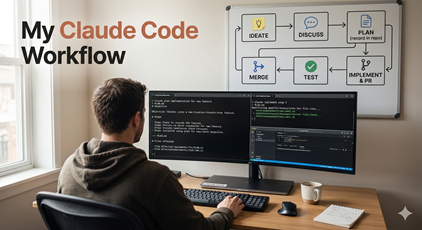
I’ve been through a lot of workflow tooling on top of Claude Code over the past few months. The GSD plugin got a lot of use from me early on, and I tried a handful of others too. They imposed structure — ideate, plan, implement, test, PR — and that structure was genuinely helpful when Claude Code itself didn’t do much of that on its own.
Something changed over the last few months though. Claude Code has added enough features, and the models have gotten good enough at reading intent, that I find myself doing nearly all my work with “pure” Claude Code plus a few skills. The scaffolding plugins used to provide now feels redundant.
My High-Level Flow
Part of what surprised me is that Claude seems to have learned how I prefer to work, and it assumes I’ll follow my high-level flow without me having to prompt for it:
- Ideate about what I want to build — new app, new feature, fix a bug, troubleshoot a problem, etc.
- Discuss various options to address my goal, refine scope, research existing code.
- Plan (plan mode) how to move forward — either a narrow plan, or a multi-phase plan over many PRs — and record the plan in the repo.
- Implement the plan (or the phase/milestone) and create a pull request.
- Test the results, unit tests and integration tests. Repeat steps 4–5 as necessary to ensure the plan or phase is good.
- Merge the PR, and go back to step 1 or 3 depending on what’s appropriate.
This is pretty close to the imposed structure from many of the popular plugins and tools out there. The difference is that these days Claude Code is happy to do this with me without the extra machinery on top.
The one step I want to call out is recording the plan in the repo. Plans are just markdown files I keep in the project, and they give me a durable artifact I can point a fresh Claude session at when I come back to a phase later. That single habit replaces a lot of what the plugins were doing for me.
Tight Iterations, Not Long-Running Agents
One caveat: my goal isn’t to start Claude and let it run for hours. To me that is a non-goal.
I work with Claude in relatively tight iterations where it works anywhere from 10 to 90 minutes between human interaction points. Iterative and fast, without the risk of spiraling off into left field. The longer I let an agent run unsupervised, the more likely it is to drift — make a wrong assumption early, build on top of it, and end up somewhere I didn’t want to go. Catching that after ten minutes is a conversation. Catching it after four hours is a revert.
Short iterations also keep me engaged with the system I’m building. If I’m going to be the systems thinker in this collaboration, I need to actually be thinking about the system, not checking back in on an agent that has been off doing who-knows-what.
Humans Have a Context Window Too
I find that my focus only allows me to really work on two things at a time, switching between two different projects (two Claude windows) and keeping both agents busy. Beyond that, I become the problem — I start making mistakes, forgetting the context of what each agent is doing, giving one agent instructions that were meant for the other.
Turns out humans have a “context window” as well. 😀
Two concurrent Claude sessions is my sweet spot. One is usually blocked on something — running tests, waiting for a build, thinking through a plan — while I’m actively engaged with the other. When both agents need my attention at the same time, one of them waits.
Parallel Work for Isolated Tasks
If Claude identifies an isolated bit of work that can be done in parallel without much human focus, I’ll sometimes spin that into yet another Claude window, or hand it to GitHub Copilot to do the work in the cloud. These are usually smaller and more isolated changes or fixes that I’m confident will fold back into my main branch without conflicting against my primary working sessions.
The key word there is isolated. If the parallel work touches the same files or the same subsystems as what I’m doing in my main sessions, I’d rather serialize it than deal with merge pain later. But a doc update, a dependency bump, a bug fix in an unrelated module — those are fine to run in parallel because they’re unlikely to collide with anything else.
Why I Don’t Miss the Plugins
Looking back, what the plugins gave me was discipline — a workflow I could lean on when Claude Code by itself felt too freeform. Today, Claude Code has enough of that discipline built in (plan mode, skills, memory, tighter tool integration) that I don’t need the external scaffolding. The workflow is still the same. The tool just handles more of it on its own.
If you’re still evaluating plugins and harnesses on top of Claude Code, my suggestion is to try going without them for a week or two. You may find, as I did, that pure Claude Code plus a habit of recording plans in the repo gets you most of what the plugins were offering — with less ceremony, and without fighting someone else’s idea of how your workflow should be structured.