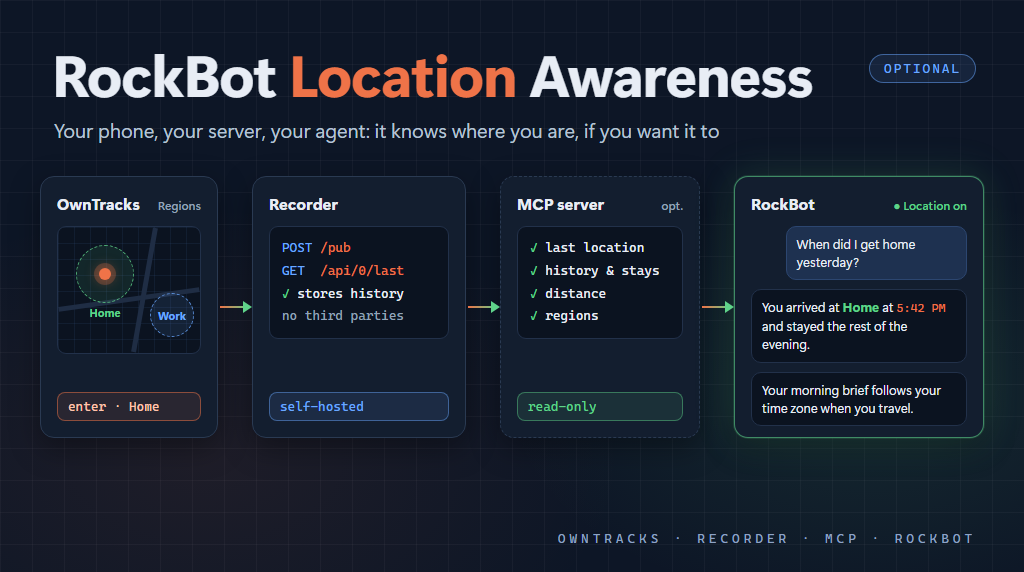
A personal assistant that doesn’t know where you are is missing something basic. Ask a human assistant “what time is my next meeting?” while you’re traveling, and they’ll answer in your local time without being told. Ask “where was I when that call came in yesterday?” and they can probably tell you. Until now, RockBot couldn’t do either of those things.
RockBot now has an optional location awareness feature. It’s off by default, and if you don’t configure it, nothing about the agent changes. Same prompts, same tools, same behavior. But if you want your agent to follow you around, it can.
What it does
There are two levels, and you can stop at the first one.
The built-in level gives the agent a rough sense of where you are:
- The agent’s clock follows your time zone as you travel, while still remembering your home time zone.
- Every turn, the agent knows your last known city and when it was reported. It never gets precise coordinates at this level: just the city, or a rough area if you haven’t set up geocoding.
- Scheduled tasks can be marked
localorhome. A morning briefing markedlocalarrives at 7am wherever you are. A task tied to office hours stays on home time.
The optional history level adds an MCP server that lets the agent answer questions about where you’ve been:
- “Where was I yesterday afternoon?”
- “How long was I at the office today?”
- “When did I get home?”
- “How far did I drive this week?”
This level returns much more detail (street addresses, exact coordinates, full history), so it’s a separate choice.
How it works, at a high level
I didn’t want RockBot to depend on a big tech company’s location service. Google doesn’t offer a usable API for your own location history anyway. So the whole thing runs on open source pieces you host yourself:
- OwnTracks on your phone. This free, open source app for Android and iOS reports your location in the background. You set it to HTTP mode and point it at your own server.
- The OwnTracks Recorder on your own infrastructure. This small server receives the reports, keeps them on disk, and serves them back through a simple REST API. It runs fine in Docker or Kubernetes. Add an optional (free tier) geocoding key, and it turns coordinates into city names and addresses.
- RockBot pointed at the Recorder. A couple of configuration values (the Recorder URL and your user name) turn the built-in feature on.
- Optionally, a location MCP server. For the history questions, I’m using OwnTracksHermes, an MIT-licensed, read-only MCP server that sits on top of the Recorder. RockBot connects to it like any other MCP server.
One important note: the Recorder has no authentication of its own. It belongs on a private network. I run mine behind Tailscale, so only my own devices can reach it.
Regions: naming the places that matter
The piece that makes this feel natural is regions. In the OwnTracks app you can define named places, such as “Home”, “Work”, “Gym” or “Cabin”. Each has a center and a radius. (The Android app calls them Waypoints; iOS calls them Regions.)
When you’re inside one of those circles, every location report carries its name. And when you enter or leave one, the phone reports it right away. So instead of the agent working out that you’re at some street address, it simply knows you’re “Home” or at “Work”. It can tell you exactly when you arrived and how long you stayed.
This also handles the case where “home” isn’t a single place. If you split time between more than one house, you just define a region for each one. The place definitions stay on your phone, not in the agent’s configuration.
Privacy is your call
Location is personal data, so the design leans toward you being in control:
- It’s entirely opt-in. Nothing happens unless you set it up.
- Everything runs on infrastructure you own. Your location history never goes to a third-party service, other than the optional geocoding lookups.
- The built-in level only gives the agent your city.
- The history level gives full detail, and you decide whether to turn it on at all.
Getting started
The full setup guide, including phone settings, Recorder deployment, RockBot configuration, the MCP server, regions and troubleshooting, is in the RockBot documentation:
If you’re new to RockBot, start at rockbot.dev. The source is on GitHub.
This post was authored with the assistance of AI.