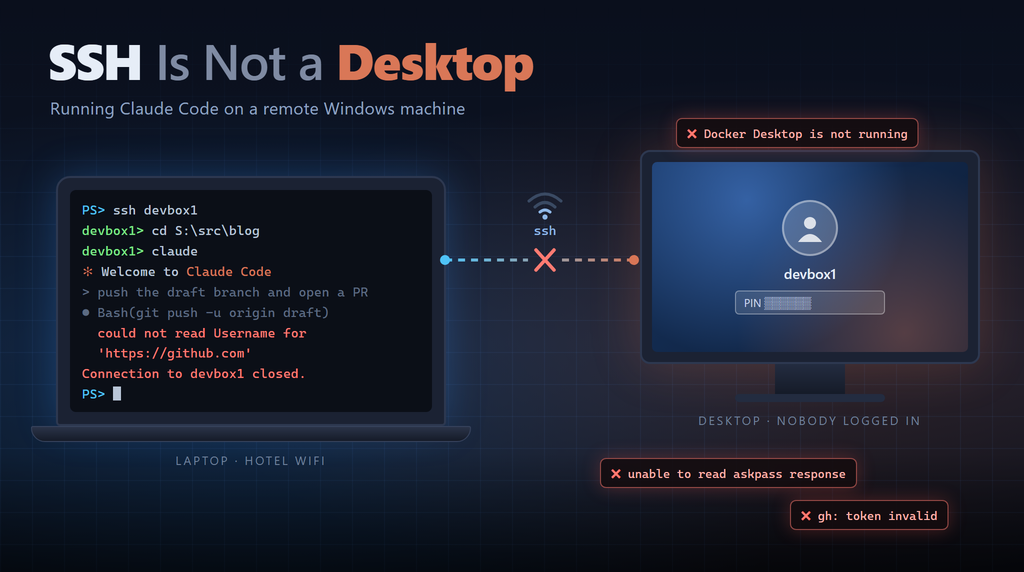
I work across three physical PCs. Two of them (I’ll call them devbox1 and devbox2) are powerful desktop machines that sit in my office and run all the time. The third is my laptop, which goes with me when I travel.
These days most of my development work is done through Claude Code. When I’m away from the office, I really don’t want to run Claude Code on my laptop. I want it running on one of the desktop machines, and I want the laptop to just be a way to talk to it.
This is the first in a series of posts about how I’ve approached that problem. I started with SSH, which is what this post is about.
Why Remote In at All?
You might wonder why I don’t just run Claude Code on the laptop. There are two reasons.
First, my laptop doesn’t have all my tools. The desktop machines have everything installed and configured: Docker, kubectl with access to my Kubernetes cluster, multiple .NET SDKs, database tools, and all my repos checked out at the same paths. Claude Code can only use the tools that exist on the machine where it is running. On the laptop some of those tools are missing, or aren’t configured, and Claude ends up stuck or trying to work around what it doesn’t have. I could try to keep the laptop in sync with the desktops, but that is a lot of ongoing work for a machine that I want to keep light and simple.
Second, and this one surprised me a bit, Claude Code uses a lot of bandwidth. Every time you interact with Claude, it sends the context (the conversation so far, files it has read, output from tools, and so on) up to the model, and then streams the response back. In a long session working on a real codebase that adds up to a lot of data - and a lot of it is upload, which is usually the weakest part of any network connection.
ℹ️ I travel quite a bit, and airplane wifi and hotel wifi are often terrible. Running Claude Code locally on a bad connection goes from slow to basically unusable.
An SSH session, on the other hand, only sends keystrokes and terminal text back and forth. If Claude is running on my desktop machine, all the heavy traffic goes over my office internet connection, and the only thing going over the hotel wifi is what’s on my screen. That’s a much better experience.
So the plan was simple. Windows has had an OpenSSH server for years, and from my laptop it is one command to get a shell on either desktop machine. ssh devbox1, cd into a repo, run claude, and get to work.
That mostly works. But I’ve run into four problems that have cost me a lot more time than I expected. The common thread is that an SSH session is not the same as being logged into the desktop, and Claude Code (and the tools it uses, like git, gh, and Docker) often assume that it is.
Problem 1: Disconnecting Kills Claude
The first problem I hit is that if I close the terminal on my laptop, or the laptop goes to sleep, or the wifi drops, whatever I was running on the remote machine dies.
From the SSH server’s perspective this is reasonable behavior. On Windows, the OpenSSH server runs everything started in a session inside a Windows job object, and when the session ends the job is torn down - along with every process in it. Running something in the background doesn’t help, and neither does Start-Process. If the process was started from that SSH session, it dies when the session ends.
For a quick git status that’s no big deal. For a Claude Code session that’s 20 minutes into a refactor, it is painful. Claude is killed in the middle of whatever it was doing, and the code is left in whatever state it happened to be in when the connection dropped.
On Linux the answer to this is tmux or screen, which let you run things inside a terminal session that isn’t tied to your SSH connection, so you can reconnect later. Windows doesn’t really have an equivalent. You can use WSL to get there, but a lot of my work is Windows-specific (.NET, PowerShell, Windows paths), so that’s only a partial answer.
Claude Code does help a little. After reconnecting, I can run claude --resume and pick up the conversation. But that only restores the conversation. If Claude was in the middle of a build, or a test run, or halfway through a set of edits, that work was interrupted, and I have to figure out where things were before I can continue. And because the whole reason I’m doing this is a bad network connection, this happens a lot.
This is the problem that eventually pushed me beyond plain SSH, and I’ll write about that in future posts.
Problem 2: Git and gh Need Different Authentication
The second problem showed up the first time Claude tried to push a branch to GitHub.
On a normal Windows dev machine, Git is set up to use Git Credential Manager (GCM). GCM works great. It pops up a browser or dialog, you sign into GitHub, and it caches a token so you never have to think about it again.
The thing is, in an SSH session there is nothing to pop up on. GCM needs either a GUI or an interactive terminal to prompt you, and when it has neither you get this very unhelpful error:
unable to read askpass response
could not read Username for 'https://github.com'
This also applies to the commands Claude Code runs, because those aren’t interactive either. So a credential setup that works perfectly when I’m sitting at the machine fails when I’m connected over SSH.
My solution was to stop using HTTPS for Git on these machines and switch to SSH keys for GitHub:
- Create a dedicated GitHub key,
~/.ssh/id_ed25519_github, with no passphrase. That’s on purpose. A passphrase means usingssh-agent, and an agent started in my desktop session isn’t available to an SSH login - which gets you right back to the same kind of failure. - Add an entry to
~/.ssh/configthat ties that key togithub.comwithIdentitiesOnly yes. Without that, ssh tries my other key first (the one I use to connect between my machines). GitHub rejects it, and after enough rejected keys you get “Too many authentication failures” and nothing works. - Set up a global URL rewrite so every repo uses SSH, no matter how it was cloned:
git config --global url."git@github.com:".insteadOf "https://github.com/"
⚠️ One gotcha with that last step:
git remote -vstill shows the https URL, because the rewrite happens when git actually talks to GitHub. If you want to see what’s really going to be used, rungit ls-remote --get-url <url>.
The gh CLI is a separate story, because it doesn’t use Git’s credentials at all. It stores its own token, and by default it puts that token in the Windows credential store. That works fine at the desktop, but I’ve had gh tell me its token is invalid over SSH when it was working fine at the console. If you run into that, gh auth login --insecure-storage writes the token to a plain file (%APPDATA%\GitHub CLI\hosts.yml) that any shell can read. As the name of the flag implies, that is a security tradeoff, so think about it before you do it.
It is also worth knowing that the GitHub MCP server authenticates separately from both Git and gh. At one point when gh wasn’t working over SSH, Claude could still read issues and create PRs through the MCP server, which kept me going while I sorted out the CLI.
Problem 3: Reboots Leave Things Half-Started
My desktop machines are “always on” - until they aren’t. Patch Tuesday comes around, Windows Update decides to reboot overnight, and the machine comes back up sitting at the login screen with nobody logged in.
The OpenSSH server runs as a Windows service, so I can still connect and start Claude. But a lot of what Claude needs to do real work doesn’t start until someone logs in. Docker Desktop is the big one. Even though it installs some Windows services, Docker Desktop is really a per-user app that starts when you log into the desktop. No login, no Docker. The same is true for anything else that starts from the Startup folder or a “run at login” setting.
From an SSH session this is confusing. I connect, start Claude, and everything seems normal until Claude tries to build a container or run tests that need one. Then it fails with an error saying it can’t connect to the Docker engine.
And I can’t really fix it from SSH. Starting Docker Desktop from an SSH session either doesn’t work, or it starts inside the SSH session’s job and dies when I disconnect (see Problem 1). What I end up doing is connecting with a GUI remote desktop tool, logging in so all the normal startup apps run, waiting for Docker to be ready, and then going back to SSH and Claude.
ℹ️ I could set the machines to log in automatically, and that would solve this problem. But that means leaving a logged-in desktop sitting there, and I’d rather not do that.
Problem 4: Sometimes You Just Need the GUI
This is the one I find most frustrating, because it kind of defeats the purpose of using SSH in the first place.
A lot of authentication and troubleshooting on Windows assumes someone is sitting at the machine:
- Signing into GitHub (or Azure, or Claude) for the first time usually means a browser-based login
- Windows Hello, UAC prompts, and “allow this app?” dialogs show up on the physical desktop, not in my SSH terminal
- Credential stores are often tied to the interactive login session, so a token you set up at the desktop may not work from SSH, and vice versa
- After a reboot, apps like Docker Desktop don’t start until someone logs in
- When something fails over SSH, the most useful question is often “does it work when I’m actually logged in?” - and you can’t answer that from SSH
So in practice, getting SSH to work, and fixing it when it breaks, often means using AnyDesk or RustDesk to connect to the same machine with a GUI. I log into the desktop, complete the browser login or click through the prompt, make sure the tool works there, and then go back to SSH to see if it works there too.
It works, but it is clunky. I’m using a GUI remote desktop tool to fix problems with my command line remote session!
Over time, my approach has been the same as with the Git problem. For each tool, find a way to authenticate that doesn’t depend on being logged into the desktop, and set it up once while I’m at the GUI. SSH keys instead of GCM. File-based tokens where the risk is acceptable. Services that start at boot instead of at login. Every tool I move over is one less reason to fire up AnyDesk.
A Productivity Tip: Review Changes Through a Branch
This isn’t really a problem, but it is something I’ve found very helpful, and it applies no matter how you connect to Claude on another machine.
When Claude is running on a different machine, the changes it makes are on that machine too. You can review them by scrolling through git diff in the terminal, but over a slow connection that’s not a great experience - especially for anything bigger than a few lines.
So I have Claude do its work in a git branch and push that branch to GitHub, usually with a pull request. Then I can review the changes on my laptop the same way I’d review anyone else’s code, in the browser using GitHub’s diff view. If I want to run or debug the code locally, I can pull the branch down to the laptop.
This post is an example! Claude helped me draft it on devbox1 while I was working from my laptop. When I wanted to read the draft, I asked Claude to create a PR, and I read it on GitHub from my laptop. My feedback went back to Claude, and each change it pushed updated the same PR.
This also has another benefit. Work that only exists on the remote machine isn’t backed up anywhere until it’s pushed. If the session dies or the machine reboots, having a pushed branch means nothing is lost.
Conclusion
If you are thinking about using SSH to connect to a Windows machine so you can run Claude Code there, here’s what I’ve learned:
- Disconnecting will kill your Claude session. On Windows anything started in an SSH session dies when the session ends.
claude --resumebrings back the conversation, but not the work that was interrupted. - Nothing can prompt you for credentials. Any login that pops up a dialog, opens a browser, or asks for a passphrase will fail over SSH. Set up credentials that don’t need to prompt.
- Know what needs a desktop login. After a reboot, anything that starts at login (like Docker Desktop) won’t be running. If Claude hits a strange error after Patch Tuesday, check that first.
- Keep a GUI option available. You’ll still need a real desktop session now and then, so have AnyDesk, RustDesk, or RDP set up before you need it.
- Review changes through a branch. Have Claude push its work to GitHub so you can review it from anywhere, and so the work isn’t only on the remote machine.
None of these problems are hard once you understand them. What makes them hard is that the error messages almost never say “this is failing because nobody is logged into the desktop.” Once I started asking “is this running in a desktop session or not?” as my first troubleshooting question, most of the mystery went away.
Even with these issues, running Claude Code on a well-equipped desktop machine and connecting over SSH is worth it. I get all my tools from anywhere, and a bad airplane connection is annoying instead of a showstopper.
SSH was my first step though, not my last. In my next post I talk about Claude Code’s Remote Control feature, which keeps the session running on the desktop machine and lets me connect to it from my laptop, a browser, or my phone, and then about going a step further and running a Remote Control server that’s always available, even when nobody is logged in.
This post was authored with the assistance of AI.